
APPLE Magic-ZML Wireless Laser Mouse (USB)
APPLE Magic-ZML Wireless Laser Mouse (USB)


- Wireless
- Interface: USB
- Laser Mouse
| Brand |
|
| Model Name |
|
| System Requirements |
|
| Form Factor |
|
| Controls |
|
| Part Number |
|
| Gaming |
|
| Wired/Wireless |
|
| Interface |
|
| Warranty Service Type |
|
| Warranty Summary |
|
| Covered in Warranty |
|
| Not Covered in Warranty |
|
- 5★
- 4★
- 3★
- 2★
- 1★
- 110
- 22
- 7
- 3
- 15
Magic Mouse works with Windows at 1300 DPI
Magic mouse is flawlessly working with Hackintosh, Macbook Pro and Windows Vista, as I do.
For windows compatibility, there's a cool workaround for this mouse which you can find on this blog: http://wp.me/p1NObF-il (not sure, if flipkart trim/mark this link as spam or not).
This is something, I couldn't fin...
Aky Joe
Apr, 2014
Nice product.....but not the best.
In terms of connectivity its nice. But the height of the mouse is lower then the other mouses you find in the market these days. and there is many mouses with the similar height as well. Its is not so comfortable when you hold the mouse because i...
Thinless Nurboo
Certified Buyer, New Delhi
Apr, 2015
Awesome product
However, the shipping took more time that I would have like it to (~ 1 week) and couple of more days delayed on the scheduled delivery day. Packaging was fine. One star less because of this.
Alok Mohanty
Certified Buyer, Bangalore
Feb, 2014
Simple and sleek
varun kumar
Certified Buyer, Bangalore
Jul, 2015
Must-Have Product for a Mac
Since it's a touch based mouse, it also comes with a nice case so that you can travel without worry. Another feature that i love is it's battery-saving technology. Even if you don't switch it off, it sleeps automatically.
Worth the price because it make...
Niranjan Ramamurthy
Certified Buyer, Bangalore
Jun, 2015
Excellent! product and delivery :)
Must recommend if you are using macbook or iMac.
Bit Expensive! but worth it :)
Naveen Verma
Certified Buyer, Gurgaon
Jan, 2015
Good quality
Reji Philip
Certified Buyer, Bangalore
Oct, 2014
It may be pricey, but totally worth it!
I received the product couple of hours back. It came in a small brown box, with foam encasing with the mouse sitting in all its glory.
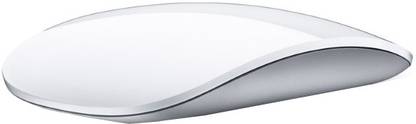
You'll fall for it as soon as your eyes gets in direct contact with it. It's inside the 'Apple-styled' minimalistic clear case. It's gorgeous looking - white, glass, sleek.
Take it out of its case, turn it on, and voila! feel the magic. It is a laser mouse, so it ...
Suman Halder
Certified Buyer, Kharagpur
May, 2014
simply the best mouse if you use mac
Akshat Mehrotra
Aug, 2013
Apple Magic Mouse
Nevertheless, is quite highly priced.
The gestural flow works quite well in scroll pages, visiting next and previous pages and is quite useful.
Great mechanism to eat and work... because this ensures you keep your hands away from the machine
Omar Wani
Certified Buyer
Aug, 2012
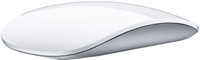
This intuitive mouse has a sleek, buttonless appearance with a multi-touch surface. This mouse itself is a button with an intelligent sensor that differentiates between different gestures like scroll, swipe or click. It even knows when you're just resting your hand on it.on it.

Run your finger vertically to scroll up or down and horizontally to move left and right while browsing a web page. This intelligent mouse captures the rate of ur scroll and continues with your momentum of action. You can also scroll 360 degrees to move within a document. To zoom in or out, just click the control key on your keyboard and scroll up or down.
If you want your Magic Mouse to function as a two-button mouse, just enable Secondary Click in System Preferences. If you are a lefty, you can reassign left and right click. Use two fingers to swipe left and right along the surface to browse photos or pages in Safari.
The Magic Mouse uses the laser tracking system which is more responsive than optical tracking. This mouse tracks with precision and accuracy on all surfaces without the need for a mousepad.
Connect this mouse wirelessly to your Mac via Bluetooth and enjoy a secure connection up to 10 metres away. This mouse is power-efficient and a quick flick of the on-and-off switch at the bottom helps conserve battery power. It is compatible with Mac OS X v10.5.8 or later versions.
Whether you want to scroll but not swipe or two-button click instead of one, all you have to do is disable or enable features in System Preferences.