

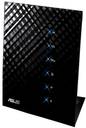
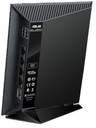

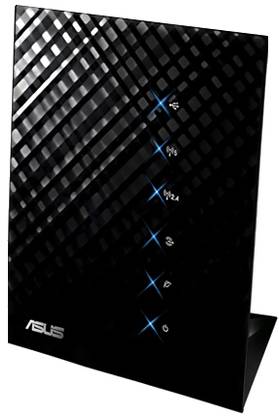
Asus RT-N56U Stylish Concurrent Dual Band Wireless-N Gigabit Router
Price: Not Available
Currently Unavailable

3 Years Manufacturer WarrantyKnow More
Highlights
- Type: Wireless Without Modem
- 300 Mbps Speed
- Frequency: 5 GHz
- Internal Antenna
- 2 USB Ports
Specifications
General
| Type |
|
| Model |
|
| Part Number |
|
| In The Box |
|
| Brand |
|
| Net Quantity |
|
Power
| Power Supply |
|
Supported Protocols
| Standard IEEE |
|
Network Features
| Frequency |
|
| Frequency Band |
|
Speed
| Wireless Speed |
|
| LAN/WAN |
|
Connectivity
| USB |
|
| Antennae |
|
| Number of LAN ports |
|
| Number of WAN ports |
|
| Number of USB Ports |
|
| WAN |
|
| LAN |
|
| Number of Antennae |
|
| Antennae Capacity |
|
Security
| Encryption |
|
| Other Security Features |
|
| Firewall |
|
Dimensions
| Height |
|
| Width |
|
| Depth |
|
| Weight |
|
Warranty
| Service Type |
|
| Warranty Type |
|
| Covered in Warranty |
|
| Domestic Term |
|
| Not Covered in Warranty |
|
| Warranty Summary |
|
Ratings & Reviews
4.2
★
52 Ratings &
22 Reviews
- 5★
- 4★
- 3★
- 2★
- 1★
- 27
- 14
- 6
- 4
- 1
5
Greatest Router available in the Market.
Well, I buy a lot from Flipkart but this one I didn't. But seeing some of the top reviews which are negative made me write this review.
I'm a serious technology enthusiast and I've been using routers for more than 14 years now. I've used a variety of routers over the years and this one is amazing.
I've been using this router for about 3 years 2 months now and its the best.
Let me first tell you about my setup at home - I've four routers. The main router is Asus RT-N56U connected to my i...
READ MOREI'm a serious technology enthusiast and I've been using routers for more than 14 years now. I've used a variety of routers over the years and this one is amazing.
I've been using this router for about 3 years 2 months now and its the best.
Let me first tell you about my setup at home - I've four routers. The main router is Asus RT-N56U connected to my i...
Santhana
Jan, 2014
3
1
Report Abuse
5
Brilliant simply brilliant
Works like a charm, as a matter of fact i am streaming music right now while writing this review ! The best part is my printer wasnt even listed on asus's website but it still works ! Hp f 300 ! And i just read the review from the person who said he has installed the latest firmare, i would like to tell you thats not the latest infact its among the oldest, i would recommend you to upgrade your firmware... No dropped connections till now for me... And i havent even hooked it up to the ups ! i ...
READ MORERishabh
Dec, 2012
0
1
Report Abuse
4
A very good router
This transmits two simultaneous wifi SSID one on 2.4Ghz and one on 5Ghz. Hooked up my PS3 using an Ethernet cable. Streamed wirelessly blue ray movie rip (25GB mkv file) without any problems and simultaneously continued using the Internet with no loss of speed.
Tried USB with 1.5TB HDD formatted to NTFS. Worked fine. Was able to FTP, windows share and also stream media from this HDD.
Four stars because my photon+ did not work, even with custom ROMS.
READ MORETried USB with 1.5TB HDD formatted to NTFS. Worked fine. Was able to FTP, windows share and also stream media from this HDD.
Four stars because my photon+ did not work, even with custom ROMS.
Gaurang Gurunathan
Certified Buyer
Jul, 2012
2
1
Report Abuse
2
Great reviews but was a nightmare
Had quite an interesting time with this router...it performed perfectly fine for the first 30 days and then the trouble began...my internet would suddenly get disconnected and when i tried to access the router's homepage i would get a message saying "the ip address of the router has changed, blah blah blah..." and the only way to get it to work again was to pull out the routers power plug and plug it back again...
after a few days of doing this the router went dead, i could see just one ligh...
READ MOREafter a few days of doing this the router went dead, i could see just one ligh...
Kiran Reddy
Certified Buyer, Bangalore
Nov, 2013
3
0
Report Abuse
2
Nice
Asus pro.ises three years warranty but you actually need one they make you run around..this started troubling after a year.I forgot that I had a 3 year warranty with still a few months to go...went to service center.awaiting replacement but product not available in market ..refund is the alternate but that too is still not given after around a month..They are all the same.
After.much pushing they went back on their refund promise and gave me a refurbished replacement.
Stopped working after a ...
READ MOREAfter.much pushing they went back on their refund promise and gave me a refurbished replacement.
Stopped working after a ...
Parminder Sandhu
Certified Buyer, Gurgaon
Aug, 2017
0
0
Report Abuse
2
Unreliable Coverage
Ugraded to this from the Linksys WRT160N, and found that there was actually a slight decrease in WiFi coverage around the house, which was severely dissapointing. Returned it right away, and picked up the TP Link WDR3600, which had much better coverage. I find that external antennas work far better than internal ones, and couldn't care less for the cosmentic value. 5Ghz AC band on the ASUS worked great though.
READ MOREAniket Patni
Certified Buyer, Pune
Sep, 2014
0
0
Report Abuse
2
belkin play max better feature to feature as its cheaper.
The belkin play max ALSO has two usb ports and has every feature this router seems to have except the belkin is for rs.6300 on flipkart.
Only thing belkin does not have is the multiple LED lights this one has and also the asus looks better.
I cannot verify regarding the gain on belkin's antennas as i have no info on the same, but if you can find out belkins antenna gain and its similar to the asus, then belkin is the one to go for due to it being much cheaper for same features.
READ MOREOnly thing belkin does not have is the multiple LED lights this one has and also the asus looks better.
I cannot verify regarding the gain on belkin's antennas as i have no info on the same, but if you can find out belkins antenna gain and its similar to the asus, then belkin is the one to go for due to it being much cheaper for same features.
Samir Arora
Jan, 2012
0
3
Report Abuse
4
Great product
Product is easy to use very scure though the 5ghz has a very limited range
READ MORERaymond Lallungawia
Certified Buyer, Aizwal
Jan, 2017
0
0
Report Abuse
4
Stylish and Sleek
I got this delivered at a good discount last month. its not as big as it looks like in the pictures. I placed it at the center of my 4 bedroom apartment and it works just fine in all corners. it would have been better to have an option to hang it up the wall which it doesnt, but I found a way to hang it using its air vents at the back. I am yet to try the Hard Drive network sharing feature as I have a private address. all in all a decent product to own if one is not looking for really advance...
READ MOREGoutham Kotera
Certified Buyer, Pune
May, 2015
0
0
Report Abuse
5
Great Router
I read a lot of reviews and finally decided to purchase this router for me and my friend based on the specifications.
This is great router by Asus which is packed with features (Dualband, Wireless-N, Gigabit) and is quite stylish (Looks good wherever you place it). Since it can be placed vertically on a stand, the space requirement is quite low.
The interface is one of the best and the router is a breeze to setup. I use many advanced features, MAC id filtering, port forwarding, etc. and tho...
READ MOREThis is great router by Asus which is packed with features (Dualband, Wireless-N, Gigabit) and is quite stylish (Looks good wherever you place it). Since it can be placed vertically on a stand, the space requirement is quite low.
The interface is one of the best and the router is a breeze to setup. I use many advanced features, MAC id filtering, port forwarding, etc. and tho...
Shrikant Khare
Sep, 2014
0
0
Report Abuse
+
All 22 reviews
Be the first to ask about this product
Safe and Secure Payments.Easy returns.100% Authentic products.



Back to top