

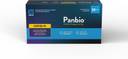
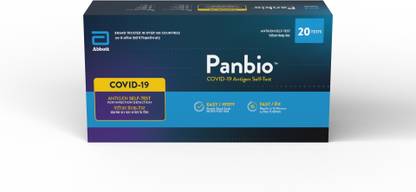
Panbio 41FK81 Antigen Self Test Kit
Price: Not Available
Currently Unavailable
Highlights
- Panbio
- 123
- Antigen Test Kit
- Directions: Carefully read these instructions prior to using Panbio™ COVID-19 Antigen Self-Test kit to ensure accurate results. Children under 14 should be supported by an adult. The following instructions are the test procedure to complete a single test. The 4 Test, 10 Test and 20 Test kits include components to complete multiple tests. If more than one individual will be tested, separate the test components to avoid confusion. BEFORE STARTING Scan the QR code on page 1 to download the NAVICA app. Open the app and follow the prompts to complete the test. Wash or sanitize your hands. Make sure they are dry before starting A. PREPARE FOR THE TEST 1. Check the expiration date on the box. Do not use if the kit is expired. 2. Ensure kit is at room temperature for at least 30 minutes prior to use. Open the box and remove 1 each of the components shown below to perform a single test. Do not open individual components until instructed. Note: A timing device (clock, timer, etc.) is required, but not provided. 3. Keep Buffer Bottle upright, twist and pull tab to open bottle 4. Squeeze the liquid from the Buffer Bottle into the Tube. You will need to squeeze at least twice. Note: Check the liquid level. Liquid should be at or slightly above the fill line on the side of the Tube. 5. Put the Tube into the Tube Rack before proceeding to the next step. B. COLLECT THE NASAL SAMPLE Keep fingers away from the Swab end. 6. Open Swab protective package at stick end. Take Swab out. 7. Swab both nostrils. Insert the soft end of the Swab straight back into your nostril until resistance is felt (about 2cm). Slowly rotate the Swab, gently rubbing it along the insides of your nasal passage at least 5 times. Remove Swab from nostril. 8. Using the same Swab, repeat step 7 in your other nostril. Check: Did you swab BOTH nostrils? 9. Insert the Swab into the Tube. Swirl in the fluid 5 or more times while pushing against the wall of the Tube. Pinch the Swab tip through the Tube to remove any remaining fluid. 10. Hold the Tube firmly with one hand. Lift the Swab and locate the break line. Snap the Swab handle at the break line. Leave the Swab in the Tube and discard stick. Note: After the swab is inserted in the buffer, the inactivation properties of the buffer plus the physical barrier of the closed extraction tube, help neutralize the COVID-19 virus. 11. Secure the Blue Cap on the top of the Tube. Return the Tube to the Tube Rack before proceeding to the next step. C. PERFORM THE TEST 12. Remove the Test Device from its protective package and place on a well-lit, flat surface. 13. Check liquid for bubbles. Wait for any bubbles to disappear as they can lead to inaccurate results. Keep Tube vertical with the white cap pointed down. Remove the white cap. Do not move the Test Device until the test is finished. 14. Squeeze 5 drops of liquid from the Tube into the well on the Test Device. Secure white cap back on Tube and wait 15 minutes. Note: If clogging occurs, gently tap the bottom of the Tube to release the blockage. Do not touch the Test Device during this period. 15. Keep Test Device flat on table. After 15 minutes, use the NAVICA app to take a photo of the Test Device and submit your result. The app will automatically submit your result to ICMR and display your test result. Do not read the result earlier than 15 minutes or after 20 minutes. Note: A Control (C) line may appear in the result window within a few minutes but a Test (T) line may take as long as 15 minutes to appear. Note: After 20 minutes the result might become inaccurate. D. READ TEST RESULT INVALID RESULT (test did not work) Find the result window. If NO Control (C) line is present, the test did not work and is considered Invalid. This may be the result of an incorrect test procedure and the test should be repeated. POSITIVE RESULT Find result window and look carefully for two lines. Positive Result: If you see two lines, Control (C) line and Test (T) line, this means COVID-19 was detected. If positive, please contact your doctor or local health department immediately and follow local guidelines for self-isolation. NEGATIVE RESULT Find result window and look for a single line in window.Negative Result: If you see only the Control (C) line is present, this means COVID-19 was not detected. If the rapid antigen test results are negative and symptoms continue,individuals should immediately be tested by RT-PCR per ICMR Advisory. You are also advised to continue following local guidelines for self-isolation and consult your doctor. Ministry of Health & Family Welfare, Government of India (https://www.mohfw.gov.in)
- https://youtu.be/JWOwJB12jak
Description
Directions: Carefully read these instructions prior to using Panbio™ COVID-19 Antigen Self-Test kit to ensure accurate results. Children under 14 should be supported by an adult. The following instructions are the test procedure to complete a single test. The 4 Test, 10 Test and 20 Test kits include components to complete multiple tests. If more than one individual will be tested, separate the test components to avoid confusion. BEFORE STARTING Scan the QR code on page 1 to download the NAVICA app. Open the app and follow the prompts to complete the test. Wash or sanitize your hands. Make sure they are dry before starting A. PREPARE FOR THE TEST 1. Check the expiration date on the box. Do not use if the kit is expired. 2. Ensure kit is at room temperature for at least 30 minutes prior to use. Open the box and remove 1 each of the components shown below to perform a single test. Do not open individual components until instructed. Note: A timing device (clock, timer, etc.) is required, but not provided. 3. Keep Buffer Bottle upright, twist and pull tab to open bottle 4. Squeeze the liquid from the Buffer Bottle into the Tube. You will need to squeeze at least twice. Note: Check the liquid level. Liquid should be at or slightly above the fill line on the side of the Tube. 5. Put the Tube into the Tube Rack before proceeding to the next step. B. COLLECT THE NASAL SAMPLE Keep fingers away from the Swab end. 6. Open Swab protective package at stick end. Take Swab out. 7. Swab both nostrils. Insert the soft end of the Swab straight back into your nostril until resistance is felt (about 2cm). Slowly rotate the Swab, gently rubbing it along the insides of your nasal passage at least 5 times. Remove Swab from nostril. 8. Using the same Swab, repeat step 7 in your other nostril. Check: Did you swab BOTH nostrils? 9. Insert the Swab into the Tube. Swirl in the fluid 5 or more times while pushing against the wall of the Tube. Pinch the Swab tip through the Tube to remove any remaining fluid. 10. Hold the Tube firmly with one hand. Lift the Swab and locate the break line. Snap the Swab handle at the break line. Leave the Swab in the Tube and discard stick. Note: After the swab is inserted in the buffer, the inactivation properties of the buffer plus the physical barrier of the closed extraction tube, help neutralize the COVID-19 virus. 11. Secure the Blue Cap on the top of the Tube. Return the Tube to the Tube Rack before proceeding to the next step. C. PERFORM THE TEST 12. Remove the Test Device from its protective package and place on a well-lit, flat surface. 13. Check liquid for bubbles. Wait for any bubbles to disappear as they can lead to inaccurate results. Keep Tube vertical with the white cap pointed down. Remove the white cap. Do not move the Test Device until the test is finished. 14. Squeeze 5 drops of liquid from the Tube into the well on the Test Device. Secure white cap back on Tube and wait 15 minutes. Note: If clogging occurs, gently tap the bottom of the Tube to release the blockage. Do not touch the Test Device during this period. 15. Keep Test Device flat on table. After 15 minutes, use the NAVICA app to take a photo of the Test Device and submit your result. The app will automatically submit your result to ICMR and display your test result. Do not read the result earlier than 15 minutes or after 20 minutes. Note: A Control (C) line may appear in the result window within a few minutes but a Test (T) line may take as long as 15 minutes to appear. Note: After 20 minutes the result might become inaccurate. D. READ TEST RESULT INVALID RESULT (test did not work) Find the result window. If NO Control (C) line is present, the test did not work and is considered Invalid. This may be the result of an incorrect test procedure and the test should be repeated. POSITIVE RESULT Find result window and look carefully for two lines. Positive Result: If you see two lines, Control (C) line and Test (T) line, this means COVID-19 was detected. If positive, please contact your doctor or local health department immediately and follow local guidelines for self-isolation. NEGATIVE RESULT Find result window and look for a single line in window.Negative Result: If you see only the Control (C) line is present, this means COVID-19 was not detected. If the rapid antigen test results are negative and symptoms continue,individuals should immediately be tested by RT-PCR per ICMR Advisory. You are also advised to continue following local guidelines for self-isolation and consult your doctor. Ministry of Health & Family Welfare, Government of India (https://www.mohfw.gov.in)
Read More
Specifications
General
| Brand |
|
| Model Number |
|
| Type |
|
| Set Content |
|
| Maximum Shelf Life |
|
Additional Features
| Key Features |
|
Legal Disclaimer
|
Ratings & Reviews
4.9
★
7 Ratings &
0 Reviews
- 5★
- 4★
- 3★
- 2★
- 1★
- 6
- 1
- 0
- 0
- 0
Have you used this product? Be the first to review!
Be the first to ask about this product
Safe and Secure Payments.Easy returns.100% Authentic products.
Back to top