

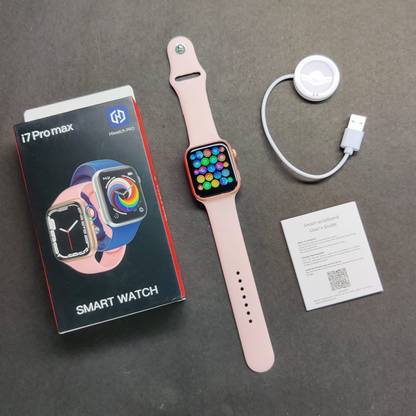
Labolia I7 PRO MAX PINK STREP Smartwatch (Pink Strap, 1 dial + charger + strap)
Price: Not Available
Currently Unavailable
Highlights
- With Call Function
- Touchscreen
- Watchphone
- Battery Runtime: Upto 18 hrs
Description
Device connection
*For the first use , you need to connect the APP for calibration . After the connection is successful , the bracelet will automatically synchronize the time .
*Turn on the Bluetooth switch of the mobile phone system ? enter the app device module settings click " Bind device , experience more features " to enter , it will automatically search for nearby Bluetooth devices on the bracelet , find and connect the bracelet device .
*After the pairing is successful , the APP will pop up a guide page . According to the instructions , jump to the mobile phone system Bluetooth search to find the WellAudio device and connect it . After the connection is successful , you can make / receive calls and listen to music ( Note : If the mobile phone system Bluetooth has not been searched WellAudio equipment , please enter the Dual mode menu and set it to On , you cannot make calls without connecting the WellAudio equipment . )
*APP will automatically save the Bluetooth address of the bracelet , and the APP will open and run in the background , and will automatically search and connect the bracelet ;
*Android phones use all notification permissions to read contact information and give the app background running in the phone settings .
Read More
Specifications
In The Box
| Sales Package |
|
General
| Model Number |
|
| Model Name |
|
| Dial Color |
|
| Dial Shape |
|
| Strap Color |
|
| Strap Material |
|
| Size |
|
| Touchscreen |
|
| Water Resistant |
|
| Water Resistance Depth |
|
| Usage |
|
| Dial Material |
|
| Ideal For |
|
| Compatible OS |
|
| Brand Strap Color |
|
Camera And Display Features
| Display Resolution |
|
| Display Size |
|
| Display Type |
|
| Scratch Resistant |
|
Additional Features
| Advanced Features |
|
Product Details
| Brand Color |
|
| Sensor |
|
| Battery Life |
|
| Battery Run Time |
|
| Sim Slot Present |
|
| Voice Caling |
|
| Multi-touch |
|
Connectivity Features
| Call Function |
|
| Bluetooth |
|
Be the first to ask about this product
Safe and Secure Payments.Easy returns.100% Authentic products.
Back to top