


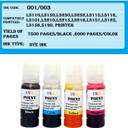
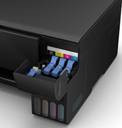
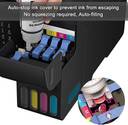


inkpoint 003 Ink for Epson L3110, L3150, L3115, L3116, L3101 Black + Tri Color Combo Pack Ink Bottle
Share
inkpoint 003 Ink for Epson L3110, L3150, L3115, L3116, L3101 Black + Tri Color Combo Pack Ink Bottle
Be the first to Review this product
Special price
₹436
₹1,999
78% off
Available offers

T&C
T&C
T&C
T&C
Warranty
This product carries limited warranty. The maximum liability of the company under this warranty is limited to the price of the Product(s) or replacement charges, whichever is lower. Further, the drying up/clogging/exhaustion of consumables/cartridges/ink/ink tank are not covered under the warranty.
Delivery
Check
Enter pincode
Delivery by14 Jan, Wednesday
?
if ordered before 10:59 PM
View Details
Highlights
- Cartridge Type: Ink Bottle
- Color: Multicolor
- Page Yield: BLACK - 8000. COLOR - 6500 Pages Pages
- Dye Based Ink
Services
- This product carries limited warranty. The maximum liability of the company under this warranty is limited to the price of the Product(s) or replacement charges, whichever is lower. Further, the drying up/clogging/exhaustion of consumables/cartridges/ink/ink tank are not covered under the warranty.
- Cash on Delivery available?
Seller

Description
Ink Point's premium refill ink, specially formulated for use with EPSON L3108 L3110 L3100 L3101 L3111 L3115 L3116 L3118 L3119 L3150 L3151 L3152 L3156 L3158 L4150 L4158 L4160 L4168 L6160 L6161 L6168 L6170 L6171 L6178 L6190 L6191 L6198 L5190 L111 PRINTER 001 INK 003 INK
Read More
Specifications
In The Box
| Sales Package |
|
General
| Brand |
|
| Model Name |
|
| Compatible Ink Type |
|
| Compatible With |
|
| Series |
|
| Cartridge Type |
|
| Operating Temperature Range |
|
| Storage Temperature Range |
|
| Operating Humidity range |
|
| Non-operating Humidity Range |
|
| Ink Drop |
|
| Color |
|
| Color Pack |
|
| Page Yield |
|
| Quantity |
|
| Net Quantity |
|
| Instruction |
|
Additional Features
| Key Features |
|
Dimensions
| Width |
|
| Height |
|
| Depth |
|
| Weight |
|
Warranty
| Warranty Summary |
|
| Warranty Service Type |
|
| Covered in Warranty |
|
| Not Covered in Warranty |
|
| Domestic Warranty |
|
| International Warranty |
|
| Type of Warranty |
|
Be the first to ask about this product
Safe and Secure Payments.Easy returns.100% Authentic products.
Back to top