

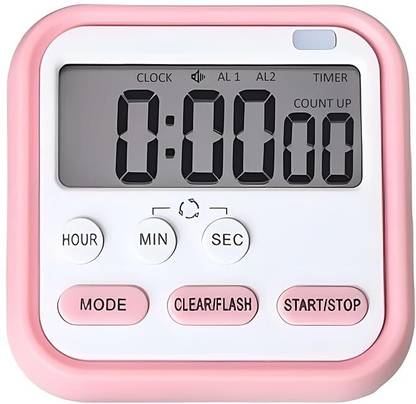
Takositio Digital Kitchen Timer & Stopwatch & Large Digits & Loud Alarm, Digital Kitchen Timer
Share
Takositio Digital Kitchen Timer & Stopwatch & Large Digits & Loud Alarm, Digital Kitchen Timer
3.9
17 Ratings & 1 Reviews
Special price
₹260
₹999
73% off
Available offers

T&C
T&C
T&C
T&C
Warranty
0
Delivery
Check
Enter pincode
Delivery by26 Dec, Friday
?
if ordered before 1:59 PM
View Details
Services
- 0
- Cash on Delivery available?
Seller
Description
Digital Kitchen Timer for Homework, Workouts, Gym Training, Cooking, Sports, Games, Office Work, Laboratory, Classroom Timer Activities (for teachers, students, kids and others).
How to Use:
1.For the first time use, please load 2 X Triple-A batteries (not included).
2.Press SEC or MIN?HOUR Button to set the second or minute?hour.
3.Press CLEAR/FLASH button will RESET the time to 00:00.
4.Press START/STOP button for 3 seconds to start/stop the timer.
5.Count up Function: Press ( MODE ) button to Count up mode, will count from 00:00 >> 00:01 >> 00:02...
6.Count Down Function: Press ( MODE ) button to Count up mode, ( NOTE: if the time in positive timing mode is not cleared, you must press ( CLEAR/FLASH ) button to clear the zero before you can countdown), after set required time, such as 15:10, press START/STOP button, will count from 15:10 >> 15:09>>15:08...When Countdown finished, the Timer will ring "Didididi..." to remind you! Press any button to stop the ringing.
Our kitchen timer with multiple timing functions
CLOCK MODE: Press and hold the (MODE) button to switch to Clock Mode when you don't need to count the time. ?Two sets of alarms?
TURN OFF MODE : Moreover, if you don't want it to work, just press and hold the (Start/Stop) button for 3 seconds to turn it off completely.
Memory Fountion: When the time to alarm prompt (alarm time is 60 seconds) press (Start/Stop) button to zero, then press (Clear) button to display the original set time (memory function) press (Start/Stop) button to restart the countdown.
Read More
Specifications
In The Box
| Sales Package |
|
General
| Brand |
|
| Model Number |
|
| Type |
|
| Material |
|
| Net Quantity |
|
| Color |
|
| Switch |
|
Additional Features
| Key Features |
|
Warranty
| Warranty Summary |
|
| Service Type |
|
| Covered in Warranty |
|
| Not Covered in Warranty |
|
Ratings & Reviews
3.9
★
17 Ratings &
1 Reviews
- 5★
- 4★
- 3★
- 2★
- 1★
- 7
- 5
- 3
- 0
- 2
4
Really Nice
The product is good, the only problem with it, the screws at the top are loose. The rest is good.
READ MOREMAHENDRA PARIYAR
Certified Buyer, Kalimpong
Nov, 2024
1
0
Report Abuse
Questions and Answers

Q:Stopwatch kitne hrs Tak ka hoga
A:Maximam 24 Hour tak set kar sakte ho
KRUSAN
Flipkart Seller5
0
Report Abuse
Q:What about battry life..cell kitne din Tak chalte hai
A:6 month
KRUSAN
Flipkart Seller1
0
Report Abuse
Q:Is the sound clear and loud?
A:yes loud
AaryaSale
Flipkart Seller1
0
Report Abuse
Q:Can it be used as a clock as well as a timer simultaneously?
A:yes,it works so smooth
Anonymous
Certified Buyer1
0
Report Abuse
Q:Can we use stop watch as well as timer
A:Yes
KRUSAN
Flipkart Seller0
0
Report Abuse
Q:Is it works like stopwatch?
A:Yes
Safiya Ikram
Certified Buyer0
0
Report Abuse
Q:Does it show current time and work like clock?
A:yes
KRUSAN
Flipkart Seller0
0
Report Abuse
Q:Is it a stopwatch or a countdown timer?
A:Only countdown timer.
Anonymous
Certified Buyer0
0
Report Abuse
Q:It has led light to watch in dark night or dark room
A:No sir
KRUSAN
Flipkart Seller0
0
Report Abuse
Safe and Secure Payments.Easy returns.100% Authentic products.
Back to top