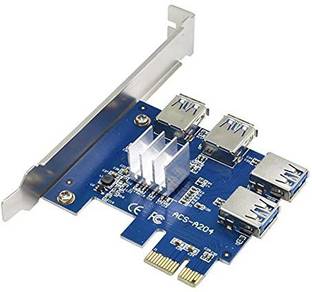
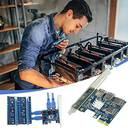
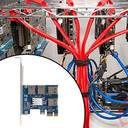
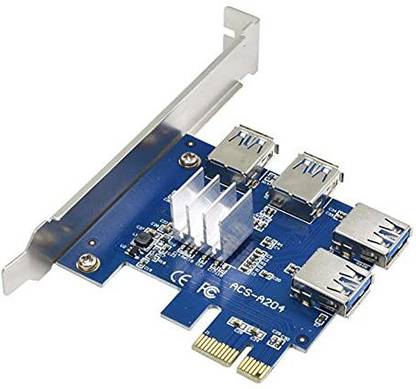
Tobo PCIe Multiplier, PCIe Splitter 1 to 4 PCI-Express 16X Slots Riser Card, PCI-E 1X to External 4 USB 3.0 Adapter for BTC Miner Machine GPU Mining Network Interface Card

Tobo PCIe Multiplier, PCIe Splitter 1 to 4 PCI-Express 16X Slots Riser Card, PCI-E 1X to External 4 USB 3.0 Adapter for BTC Miner Machine GPU Mining Network Interface Card (Blue)

Share

Tobo PCIe Multiplier, PCIe Splitter 1 to 4 PCI-Express 16X Slots Riser Card, PCI-E 1X to External 4 USB 3.0 Adapter for BTC Miner Machine GPU Mining Network Interface Card  (Blue)

Be the first to Review this product

Special price
₹1,529
4,999
69% off
i
Available offers
  • Bank Offer5% cashback on Axis Bank Flipkart Debit Card up to ₹750
    T&C
  • Bank Offer5% cashback on Flipkart SBI Credit Card upto ₹4,000 per calendar quarter
    T&C
  • Bank OfferFlat ₹50 off on Flipkart Bajaj Finserv Insta EMI Card. Min Booking Amount: ₹2,500
    T&C
  • Special PriceGet extra 10% off
    T&C
  • Warranty
    1 Months Manufacturer Warranty
    Delivery
    Check
    Enter pincode
      Delivery by26 Dec, Friday
      ?
      if ordered before 7:59 PM
    View Details
    Highlights
    • USB 3.0 Adapter Connector
    • Color: Blue
    Services
    • 1 Months Manufacturer Warranty
    • Cash on Delivery available
      ?
    Seller
    Tobo
    3.4
    • 7 Days Return Policy
      ?
  • See other sellers
  • Description
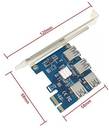
    Name: PCI-E one turn four expansion card Bus interface: PCI-E X1 (compatible with X4, X8, X16 slot) Interface type: PCIE to 4-port USB 3.0 Product size: 120mm (bracket length) *67mm*57mm Support system: DOS, Linux, Windows XP/7/8/10 Package included: 1 X PCI-E to 4 USB 3.0 Converter Card
    Read More
    Specifications
    General
    Brand
    • Tobo
    Model Name
    • td-PCI-E Expansion Card
    Other Features
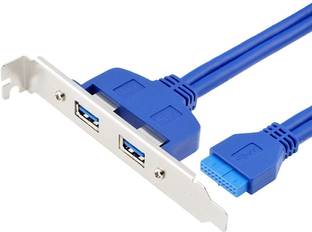
    • The First Step, When You Use The Adapter Card, The Computer Needs To Be Turned Off Before They Can Connect The Adapter Card. 2. The Second Step, Connect To The Motherboard'S Pci-E Slot. Use Usb3.0 Data Cable Adapter To Connect The Ends Of The Two Usb Port. Connect The Power Supply. 3. The Third Step: After Completion Of The Above Two Steps, First In No Hurry To Insert Your Pci-E Card, Start The Computer To See If Your Computer Has Been Identified To The Riser Card, If You Did Not Find The Card, Repeat The Above Operation.
    Compatibility
    • Compatible System: Replacement For Dos, Replacement For Linux, Replacement For Winxp/Win7/Win8/Win10.
    Model
    • PCIe Multiplier, PCIe Splitter 1 to 4 PCI-Express 16X Slots Riser Card, PCI-E 1X to External 4 USB 3.0 Adapter for BTC Miner Machine GPU Mining
    In The Box
    • 1* PCI-E 1 to 4 Riser Card
    Color
    • Blue
    LED Indicators
    • No
    Remote Boot
    • No
    Boot Rom Socket
    • No
    Additional Features
    Key Features
    • Recently, new motherboards have appeared on the market. The factory default setting of the LPE-4X is GEN3. As a result, the computer cannot recognize the graphics card or the exclamation mark appears. You need to set the BIOS to set the PCI-E16x speed to GEN2 or GEN1, recommended to set to GEN2.
    Type
    Wireless
    • No
    Warranty
    Service Type
    • 1 Months Manufacturer Warranty
    Covered in Warranty
    • only internal Issue i.e. not working etc.
    Not Covered in Warranty
    • Physical Damage, Damage by Human, Water Damage etc.
    Warranty Summary
    • 1 Months Manufacturer Warranty
    Domestic Warranty
    • 1 Months
    Port Connection
    Connector Support
    • USB 3.0 PCI-E
    Connector Type
    • USB 3.0 Adapter
    Number of Connectors
    • 4
    Be the first to ask about this product
    Safe and Secure Payments.Easy returns.100% Authentic products.
    You might be interested in
    Routers
    Min. 50% Off
    Shop Now
    Computer Components
    Min. 50% Off
    Shop Now
    Motherboards
    Min. 50% Off
    Shop Now
    LAN Adapters
    Min. 50% Off
    Shop Now
    Back to top