

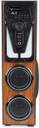
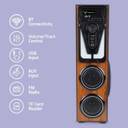
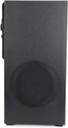
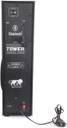
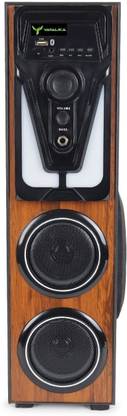
YATALIKA MINI TOWER 60 W Bluetooth Tower Speaker (Black, 2.1 Channel)
Share
YATALIKA MINI TOWER 60 W Bluetooth Tower Speaker (Black, 2.1 Channel)
Be the first to Review this product
₹4,980
₹7,999
37% off
Available offers

T&C
T&C
T&C
T&C
Warranty
Manufacturing defects — flaws in materials or workmanship. Electrical failures — e.g., internal circuitry, drivers, subwoofer, amplifier (if the failure originates from a manufacturing defect). Original purchaser only — warranty typically valid only for the first buyer and cannot be transferred. Alphatec +1 Carry-in or service-center-based repairs — you may need to bring the speaker to an authorized service center rather than expecting on-site support. Alphatec +1 Proof of purchase required — invoice/receipt and often a stamped warranty card must be retained to claim warranty service
Delivery
Check
Enter pincode
Delivery by10 Feb, Tuesday
?
if ordered before 6:59 AM
View Details
Highlights
- Power Output(RMS): 60 W
- Power Source: AC
- Bluetooth Version: 3.0
- Wireless range: 10 m
- Wireless music streaming via Bluetooth
- Memory Card Slot
Services
- Manufacturing defects — flaws in materials or workmanship. Electrical failures — e.g., internal circuitry, drivers, subwoofer, amplifier (if the failure originates from a manufacturing defect). Original purchaser only — warranty typically valid only for the first buyer and cannot be transferred. Alphatec +1 Carry-in or service-center-based repairs — you may need to bring the speaker to an authorized service center rather than expecting on-site support. Alphatec +1 Proof of purchase required — invoice/receipt and often a stamped warranty card must be retained to claim warranty service
- Cash on Delivery available?
Seller

Description
The YATALIKA Tower Speaker delivers powerful, immersive sound with crystal-clear audio and deep bass, perfect for music lovers and entertainment enthusiasts. Designed with a sleek and modern aesthetic, it enhances the style of any room while providing exceptional sound quality. Equipped with multiple connectivity options like Bluetooth, USB, AUX, and SD card support, it ensures seamless playback from various devices. Whether you're hosting a party, watching movies, or enjoying your favorite playlist, the YATALIKA Tower Speaker transforms your space into a dynamic sound experience.
Read More
Specifications
Other Details
| Chassis Material |
|
| Sensitivity |
|
| Controls |
|
| Remote Control Support |
|
| Driver Size |
|
| Separation |
|
| Power Input |
|
| Coverage Pattern |
|
| Features |
|
| Key Features |
|
| Other System Requirements |
|
| Speaker Type |
|
Warranty
| Warranty Service Type |
|
| Warranty Summary |
|
| Covered in Warranty |
|
| Not Covered in Warranty |
|
| Domestic Warranty |
|
| International Warranty |
|
Audio Features
| Audio Codec |
|
| Signal to Noise Ratio |
|
| Maximum Output RMS Subwoofer |
|
| Amplifier |
|
| Maximum SPL |
|
| Tweeter Support |
|
| Distortion |
|
| Other Audio Features |
|
In The Box
| Sales Package |
|
General
| Brand |
|
| Model Number |
|
| Model Name |
|
| Type |
|
| Bluetooth |
|
| Memory Card Slot |
|
| Configuration |
|
| Power Source |
|
| Power Output (RMS) |
|
| Impedance |
|
| Color |
|
| Wired/Wireless |
|
| Subwoofer |
|
| Built-in Fm Radio |
|
| Outdoor Usage |
|
| Brand Color |
|
Dimensions
| Subwoofer Width |
|
| Cable Length |
|
| Satellite Width |
|
| Width |
|
| Height |
|
| Depth |
|
Product Details
| Headphone Jack |
|
| Configuration |
|
| Memory Card Supported |
|
| Driver Type |
|
| Compatible Devices |
|
| Display Type |
|
| Connector Type |
|
| USB Ports |
|
| Bluetooth |
|
| Bluetooth Range |
|
| Touch Pad |
|
| Smart Assistant Technology |
|
Frequently Bought Together
₹4,980
₹7,999
37% off
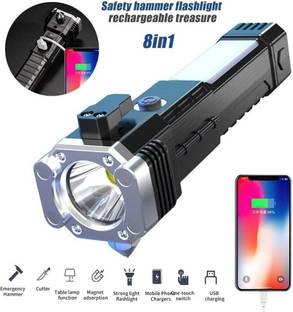
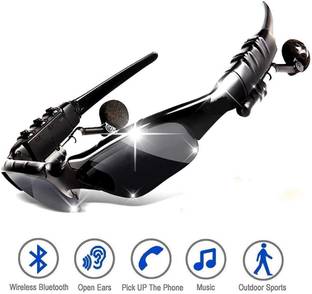
Please add at least 1 add-on item to proceed
Be the first to ask about this product
Safe and Secure Payments.Easy returns.100% Authentic products.
Back to top